How the internet works?
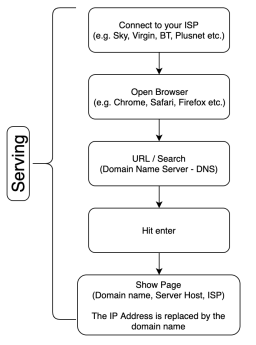
- Open Browser
-Connect to internet through ISP - URL/Search
– Domain Name Server (DNS) - Hit Enter
- Show Page
– Domain Name
– Server Host
– ISP provides hosting
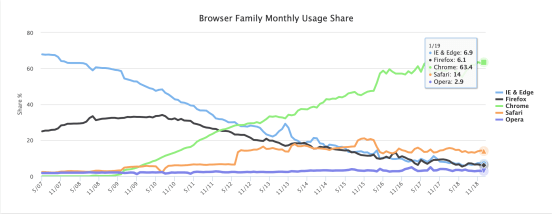
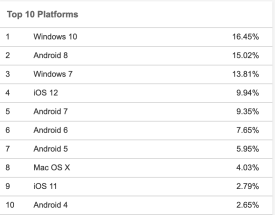
Usage of browsers:

Dynamic vs Static
Dynamic (Content Management System) can be changing all the time, updating all the time. Can be updated by anyone (Knowledge of coding not needed). Made of a database of lots of different files
E.g. News, E-commerce, Blog etc.
Static stays the same. Needs to be changed by a web developer with knowledge of HTML, CSS, Java, PHP. Made of individual files.
Content Management Systems

Open Source Software is available for the general public to use and modify from its original design free of charge. e.g. WordPress, Drupal, Joomla etc.
Benefits of OSS:
- More flexibility
- Costs less or is free
- Constant updates to match best practices
- Requires more hands-on management
- Community contribution of plugins and themes
- Lightweight and simplistic code
Drawback of OSS:
- Highly professional site often needs a better design than what a free theme can provide.
- Possibly less security overall
- Direct support generally doesn’t exist with an open-source system
- Issues can also arise from conflicting plugins and bad updates.
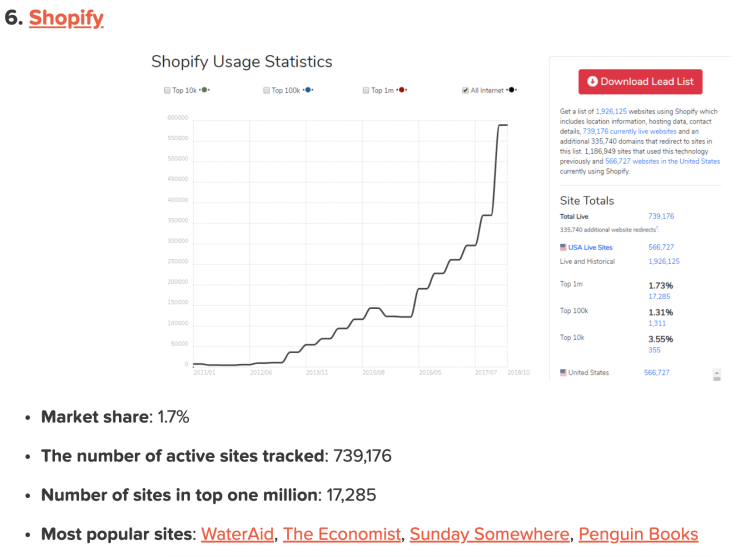
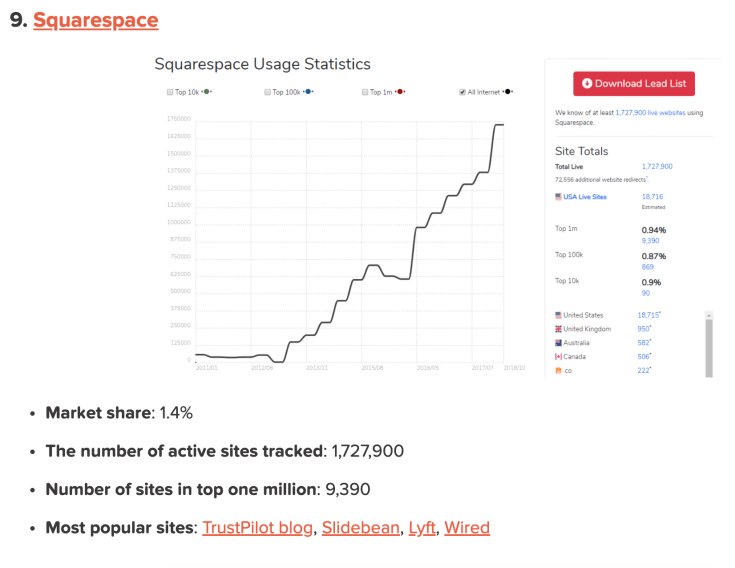
Closed Source Software is not shared with the public for anyone to look at or change. You have to pay for the license to be able to use it. e.g. Shopify, Blogger, Squarespace
Benefits of Closed Source:
- Unique solution for each application
- Potentially more features out-of-the-box
- Totally hands-off use
- Possibly more secure
Drawbacks of Closed Source:
- Requires trust in the development team
- Higher costs initially and for maintenance
- Likely to have fewer enhancements (themes, plugins, etc.)
- What do you get for the price?
- If the developer shuts down then your website will be obsolete.
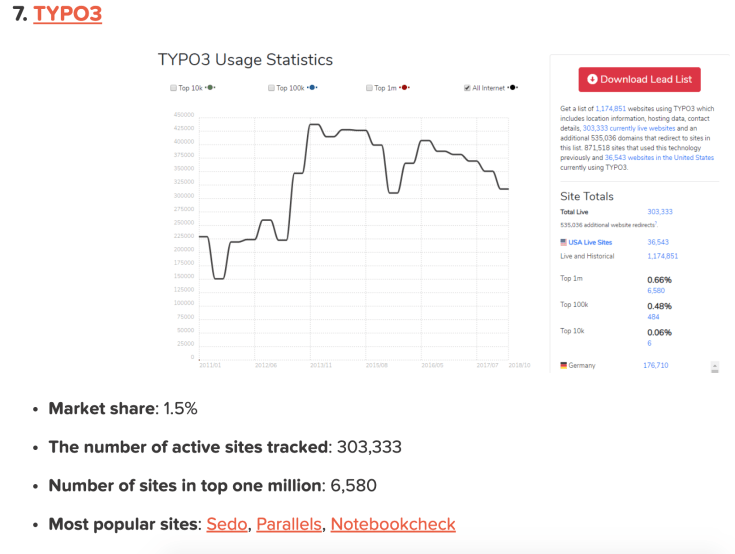
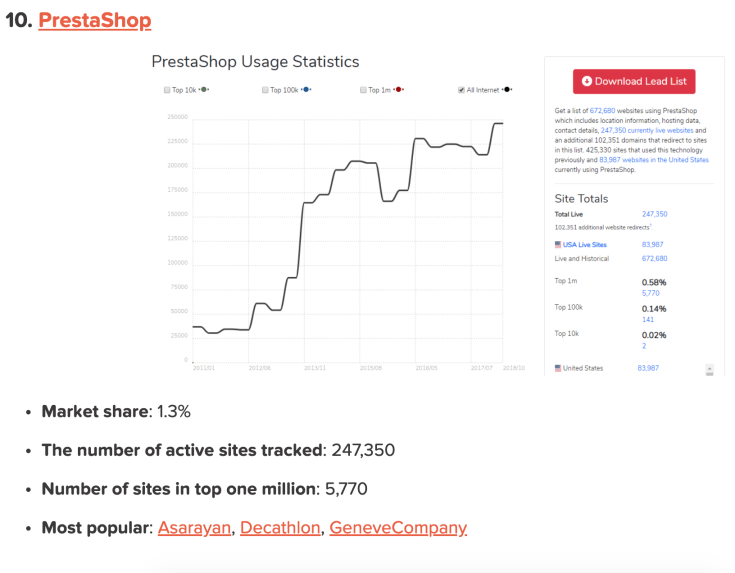
CMS Stats: https://websitesetup.org/popular-cms/



Why is WordPress so popular?
1. PLUGIN STABILITY AND AUTONOMY
Most WordPress plugins do not need other plugins which require updates at differing times. This spares the user from extra monitoring and maintenance. If your online business presence has little room for downtime or costly maintenance, this is an ideal platform. The average multi-plugin update takes about 15 minutes if you back up your database manually, a few minutes with a backup plugin, and a few seconds for run-of-the-mill maintenance.
2. MULTISITE OPTION
One very exciting option recently introduced is the ability to host multiple WordPress sites on the same installation. This feature allows you to create a site for each of your sales agents or representatives without purchasing extra websites or hosting packages.
3. PLUGIN POWER AND VERSATILITY
Do you need to sell your timeshare? Perhaps you have to list and filter your content, so jobs automatically show on one page and blog posts on another. Are you building an effective and unobtrusive SEO interface for your bloggers? Are you tasked with planning and listing events, or perhaps selling classified ad space? WordPress is home to many masterwork plugins such as My Calendar, List By Post, All In One SEO Pack, ShareThis, and Advanced Custom Fields. Over 44,000 Plugins available.
4. EASE OF USE
If you’ve ever plodded through hand-coding a website or worked with an unnecessarily complex CMS, you’ll be pleased with WordPress’s easy learning curve and organization. You can switch themes in under ten seconds, use quick-edit options to insert a tag you forgot without re-opening your article, make a post sticky, or link to existing content from a drop-down menu. When time is money, WordPress is your financial advisor. When you’re looking to outsource your web design needs to a tech company you can also rest easy that maintenance won’t soak up a large part of your budget.
5. THEMES
From lightweight frameworks to elegant powerhouses, free and paid themes abound, created by casual coders and professional designers alike. Whether you need a theme geared toward load time, appearance, or features, then WordPress has it. Over 8600 Themes Available
6. SEO
WordPress has good potential for SEO. Can help you to get to the top of Google easily.
Can be on page 1 of Google within 2 weeks.
Server Types
PHP requires a Linux server
ASP requires a Windows server
- GoDaddy
- FastHosts
- 1&1
- BlueHost
- 123Reg
Shared –
Lots of websites on the same server (Cheap)
VPS –
A server running within a server. One physical server hosts multiple virtual servers, each isolated from the others. (Medium price)
Dedicated –
You own the server specifically for your site (Expensive)
You want your server to be in the same country as you. If it’s in a different country it can negatively affect SEO.
Final Task
Provide a brief outline for a concept for a new website connected to your workplace. Complete a technical specification to cover the infrastructure required in order to run the website.
Detail all components required to successfully deploy your website.
Include your choice of CMS and your reason for choice.
My website will be specifically for Digital Freelance blogs to be posted on.
The first choice to make is which hosting provider I will choose. I would choose GoDaddy and more specifically their Economy package for web hosting.
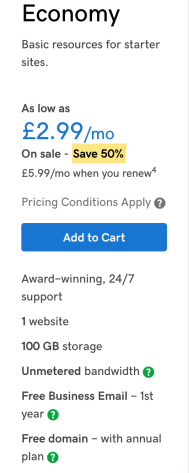
The reason for this is that the blogs won’t use up too much storage so the basic economy package will be perfect for the website. It will be on a shared server but this is ok as we won’t be storing any personal information on the server.
The Content Management System (CMS) I will use is WordPress. I’ve chosen WordPress as it is simple to use, Open Source, and perfect for blog posting. You can also choose from over 44,000 plugins to help with SEO, site building and more. It also allows you to choose from thousands of themes to help design your site.
 The Reuben Bowers Apprenticeship Experience
Leave a comment